![Variation=Brandmark, Color=WhiteVector.svg]](https://support.q7leader.com/hubfs/Variation=Brandmark%2c%20Color=WhiteVector.svg)
The Conversations module works differently from TeamScan and SelfScan.
In Conversations, the campaign itself creates the Conversations, whereas in TeamScan and SelfScan, users must take action to create their scans. In other words, TeamScans and SelfScans are created by the user starting from the tasks in the Dashboard, while Conversations items are generated automatically by the campaign and can simply be opened via the Dashboard.
Two things to keep in mind before starting a Conversations Campaign:
-
Verify reporting lines: Ensure all team members are assigned to the correct managers. Once campaign conversations are created, participants cannot be changed, and campaign conversations cannot be deleted.
-
Review the conversation template carefully: Make sure the template is 100% correct. Pay special attention to the objectives question: confirm that the correct cycle is linked and that the appropriate validation rules are set. Refer to this article for more information.
When should you create the Campaign?
To ensure that the Conversations are generated correctly, the campaign must be created before its scheduled start date.
Why?
Our system generates them automatically at 2:00 a.m. on the start date of the Campaign.
Creating the campaign in advance ensures that the tasks will be created on time and participants can access them as expected.
Example:
Today is 23/12. To ensure your participants can access the Conversations template, the campaign should be scheduled to start at the earliest tomorrow, 24/12.
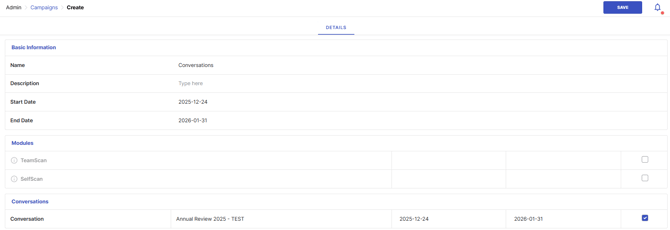
For more information on creating a campaign, please refer to this article.