![Variation=Brandmark, Color=WhiteVector.svg]](https://support.q7leader.com/hubfs/Variation=Brandmark%2c%20Color=WhiteVector.svg)
What is the Data Collection File?
The Data Collection File is a spreadsheet that helps you add information in MyQ7Leader all at once, instead of doing it manually one by one.
This guide explains exactly how to fill it in, step by step.
This video will also help you complete the file.
Step 1: Open the File
-
Open the Data Collection File from Q7Leader in Google Sheets or Excel.
-
Do not rename or change the file structure.
Step 2: Understand the File
-
In the first sheet, you will find instructions explaining how to fill in the two other sheets: Departments and Team Members.
-
The second sheet is the Departments sheet. This is where you define and complete your departmental structure.
-
The third sheet is the Team Members sheet. This is where you enter information about your team members.
Step 3: Fill in the Information
Departments Sheet:
-
In Column A, enter the name of each department, one department per row.
-
Column B contains a dropdown menu listing the departments entered in Column A.
-
In Column B, select the parent department for each department.
Example:
If the department name is Accountability, select Finance as its parent department.
This step allows you to define the hierarchy between departments.
Team Members Sheet:
-
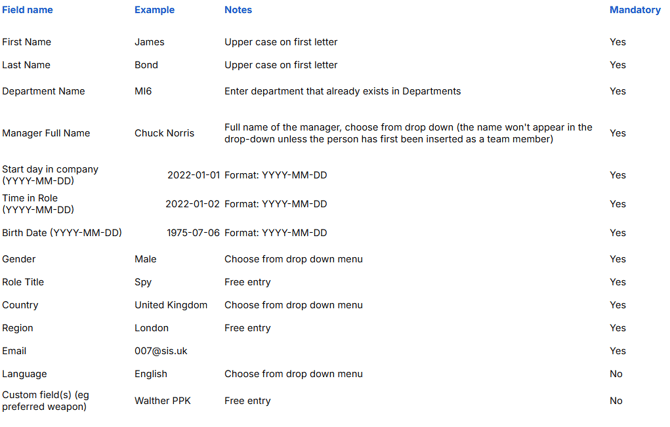
Each column represents a specific type of information (for example: names, departments, birthday date).
-
Each row represents one team member.
-
The first row contains the column titles, do not modify them.
Please follow the instructions below to correctly fill in each column:
Important Data Checks Before Upload
To upload the file correctly, some data must be coherent and consistent:
-
A team member cannot be listed as their own manager.
-
A team member’s birthday cannot be after their start date in the company.
-
The Time in Role can be before the start date in the company, if applicable.
- All managers must exist as team members as well.
Make sure to review these points before uploading the file to avoid errors.