![Variation=Brandmark, Color=WhiteVector.svg]](https://support.q7leader.com/hubfs/Variation=Brandmark%2c%20Color=WhiteVector.svg)
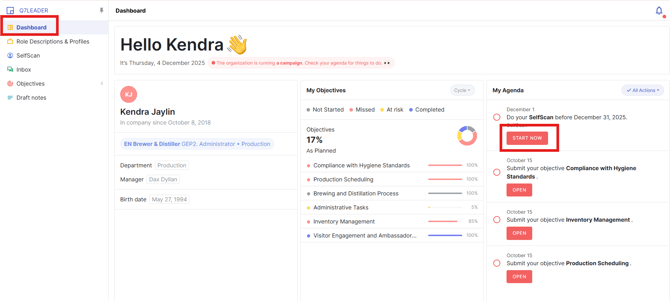
Step 1: Accessing the Dashboard and Your Task
- Start by logging into your myQ7Leader.
- Navigate to your Dashboard and open the “SelfScan" Task by clicking "Start Now".
Step 2: Fill in the Information
- Once the task is open, carefully enter the required information in each field.
- Take your time to ensure that all details are accurate and complete.
This guide explains step by step how to complete the SelfScan.
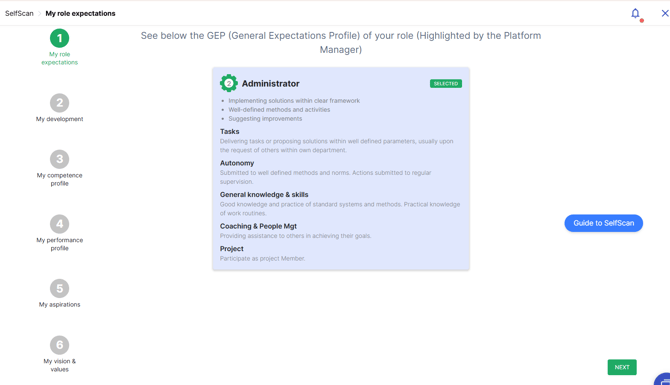
The “Guide to Self-Scan” button on the right will take you directly to the article.
Step 3: Submit Your SelfScan
- After completing all the necessary fields, review your entries to ensure everything is correct.
- Once you’re satisfied, click the “Finish & Submit” button.

You should see a confirmation message indicating that your SelfScan has been successfully submitted.

Submitting your SelfScan does not share it with anyone. It will only appear in HR’s report as confirmation that you’ve completed the task, nothing else.
To modify or delete your SelfScan, follow this article.