![Variation=Brandmark, Color=WhiteVector.svg]](https://support.q7leader.com/hubfs/Variation=Brandmark%2c%20Color=WhiteVector.svg)
In this article you will learn:
- How to Reset your Password
- How to Change your Password
This article in only applicable to clients using myQ7Leader credentials.
However if you are using a SSO, then you need to reset your password directly in your internal system provider (Microsoft, Google or Okta).
If you are already a user in the platform then you can go to https://my.q7leader.com/ and fill in your email address.
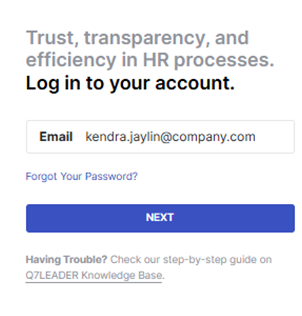
If you just received an invitation to log in to myQ7Leader and you don't know how to process, then you can read this article on How to Register/Log In to MyQ7Leader.
How to Reset your Password
If you have forgotten your password, you can request an email to reset it.
Click on "Forgot Your Password?" in the login page.
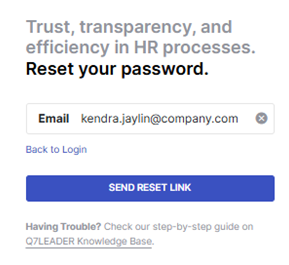
Then you will be asked to provide your email where you will receive the reset your password email from the address welcome@q7leader.com.
Once done, click on "Send Reset Link" and the email will be sent within minutes.
The email received will look like this:
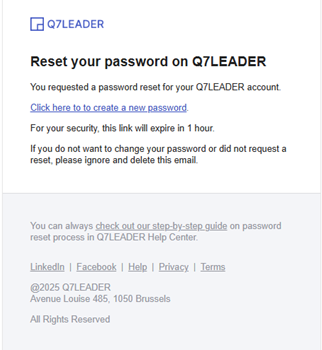
If the password reset email doesn't come within a few minutes, first check your spam folder. If it does not come, it might be due to 2 issues:
- you might have mistyped your email or are using the wrong email address
- your have not previously registered to the platform with this email address, in which case you need to contact your HR Administrator for help
Please click on "Click here to create a new password", which will redirect to the password reset page:
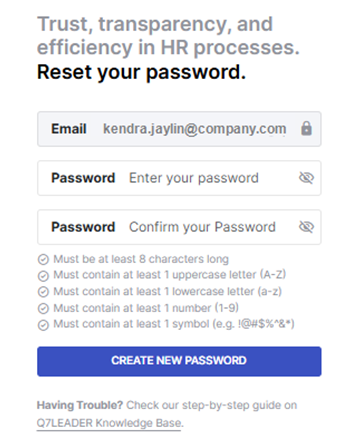
You can create a new password while being mindful of the security rules described.
When the new password has been created, you will then log in with the new credentials:
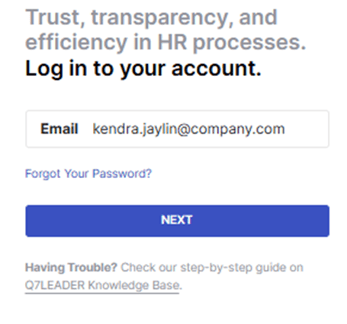
And congratulations! You now have access to MyQ7leader.
How to Change your Password
If you want to change your password, go to https://my.q7leader.com/ and log in with your email address and current password.
You will arrive on your user page. Then, go to the bottom left corner, click on your "Name", then select "Profile" :
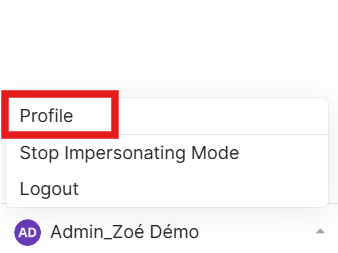
In the Change password section:
- Enter your current password
- Type your new password
- Confirm the new password
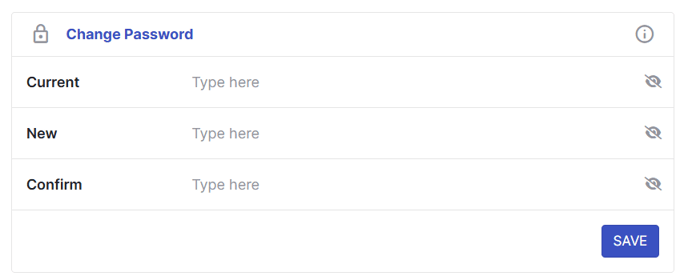
Make sure your new password follows the required security rules.
Click on "Save" to apply the change.
From now on, you will need to log in using your new password.