![Variation=Brandmark, Color=WhiteVector.svg]](https://support.q7leader.com/hubfs/Variation=Brandmark%2c%20Color=WhiteVector.svg)
Preparing Your Talent Cycle - Key Steps for a Smooth and Successful Launch
Launching a Talent Cycle requires more than just activating a campaign, it relies on clean data, clear communication, and proper setup within myQ7Leader.
Ensuring everything is in place beforehand will help your managers and employees navigate the process easily and will improve the quality and reliability of your outcomes.
Below is a complete checklist and explanation of the actions you should take before going live.
Checklist:
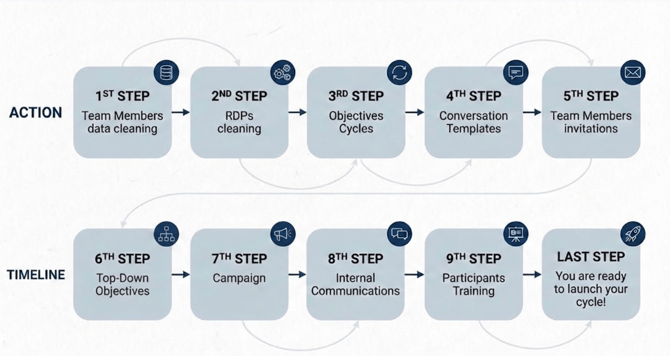
Step 1: Clean your team members’ and users data
Start by reviewing all user information to make sure it is accurate and up to date.
This includes:
-
Email addresses
-
Roles, Job titles, GEP and Time in Role
-
Reporting lines (Managers)
-
Active vs. inactive team members
Well-maintained data ensures that the right people receive invitations, the correct reporting relationships are applied to conversations and objectives, and no errors occur within the workflow.
Find more information on managing team member data here.
Note that mass updates can be performed via import. Read this article for more guidance.
Step 2: Review and clean RDP data (if applicable)
If your organisation uses RDP (Roles Description and Profiles), take the time to verify that:
-
Each employee has the correct RDP & GEP assigned
-
The information in the RDP library is complete and current
-
Outdated or duplicated files are removed or corrected
Accurate RDPs avoid confusion and ensure that managers and employees work with the right material during their Talent Cycle conversations.
Step 3: Clean or configure objective cycles (if applicable)
If objectives are part of your process, confirm that all objective cycles are properly set:
-
Correct start and end dates
-
Archiving of old or unused cycles
- Creating the cycle for the new year
Having well-structured objective cycles ensures consistency between past performance, future expectations, and the Talent Cycle discussions.
More information on the objectives cycles here.
Step 4: Set up conversation templates
Depending on your Talent Cycle structure, you may need separate conversation templates for:
-
Review of past period
-
Review of future period
-
A combined or hybrid approach
- Different languages
Make sure your templates include the correct questions, rating scales, behavioral indicators, and instructions so that all users follow the same standards and methodology.
It is also crucial that the correct cycles are linked to the objective questions and that the proper validation rules are in place (weight limit, metric type).
It is essential that the template is fully finalized before going live, as no changes will be possible afterward.
More information on the templates creation here.
Step 5: Send invitations to your Team Members
If team members haven’t been invited yet, they should be invited at least one week before the campaign starts.
Follow this article to learn how to invite your team members to log in to the platform.
Monitor invitations and follow up until all are accepted.
See our article on sending and checking pending invitations.
Timeline note: Team members must accept their invitations before objectives are uploaded and before the conversation campaign begins. If not, the administrator will need to reset all submissions to allow participants to submit their items, which can be a lot of extra work.
Step 6: Configure top-down objectives (if applicable)
If applicable to your organization, you should set up your top-down objectives before the campaign starts. Ensure that the objectives are imported just before the campaign starts, but after all affected team members have accepted the invitations to the platform.
You can import objectives in bulk to save time. Please follow this article for step-by-step instructions.
When setting the objectives, make sure that the weighting for each objective is equal to or lower than the weighting configured in the template. This ensures consistency and prevents any errors during the campaign.
Step 7: Configure your campaign and understand the impact of dates
When your data and templates are ready, you can configure the Talent Cycle campaign.
Be sure you fully understand:
-
Opening and closing dates for each module
-
Deadlines for employees and managers
-
How stages overlap across teams or departments
-
Automated emails that will be sent
Good timing and clarity around deadlines help maintain engagement and reduce delays.
The end date of TeamScan must be set after all DOT meetings are completed, and enough time should be allowed for all processes to finish. Once the end date is reached, it cannot be changed.
To configure your campaign, follow this article.
For campaigns that include conversations, please review this article, as there are some specific considerations to keep in mind.
Step 8: Prepare internal communications
Communication is essential for a successful Talent Cycle. Plan separate messages for:
-
Employees
-
Managers
-
HR partners
-
Leadership or sponsors
Explain what the Talent Cycle involves, what is expected from each group, the key dates, and where to find guidance or support materials.
Step 9: Train new users and provide support materials
Finally, make sure everyone knows how to use the system:
-
Offer training sessions for new managers or employees
-
Share guides, videos, FAQ pages, or internal documentation
-
Provide contact points for questions or support
Proper training reduces confusion and ensures your Talent Cycle runs smoothly from start to finish.
Browse our knowledge base to find the documentation to share.
A successful Talent Cycle starts with strong preparation. By cleaning your data, configuring all relevant tools and templates, planning your campaign carefully, and supporting your users through communication and training, you create a seamless experience that delivers high-quality outcomes for your organisation.