![Variation=Brandmark, Color=WhiteVector.svg]](https://support.q7leader.com/hubfs/Variation=Brandmark%2c%20Color=WhiteVector.svg)
The Announcement Bar lets you display a highlighted message at the top of every user's dashboard. It appears in bright yellow and is ideal for company-wide announcements, onboarding new users, or time-sensitive communications.
Best Use Cases
- Welcoming new users during onboarding
- Announcing campaigns
- Highlighting a new feature or update
- Communicating time-sensitive information (e.g., campaigns deadlines)
Where to Find It
- Go to Admin section
- Navigate to Settings
- Select Announcement Bar
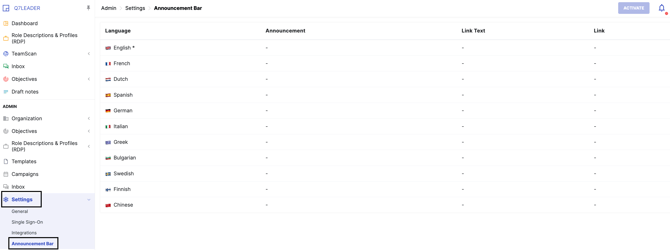
Creating an Announcement
-
Enter your announcement text: you can create the message in all available languages to ensure every user sees it in their preferred language. In case a language is left empty, the version shown when the platform is set in that language will be the English one.
Note: The English version is always required. The announcement bar displays the language that matches the user's platform language setting (not the browser language).
Adding a Link (Optional)
You can include a clickable link in your announcement:
| Field | Description |
|---|---|
| Link | The URL destination (external webpage or internal resource) |
| Link Text | The clickable text users will see (e.g., "Learn more", "Click here") |
Activating the Announcement
- Click Activate to make the announcement visible
- Click Deactivate to hide it when no longer needed


What Users See
The announcement appears as a bright yellow bar at the top of the Dashboard page. All users will see it when they log in.
