![Variation=Brandmark, Color=WhiteVector.svg]](https://support.q7leader.com/hubfs/Variation=Brandmark%2c%20Color=WhiteVector.svg)
As an administrator, you can perform the following actions within the Objectives and Inbox modules:
-
Lock (Objectives module)
-
Partially lock (Objectives module)
-
Unlock (Objectives module)
-
Reset submissions (Objectives and Conversations modules)
For more information about these actions, please refer to this article.
Navigate to the Objectives or Conversations (via Inbox) module from the Admin section.
- If you need to perform a single action on one row, click the three dots at the end of the row.

- If you need to perform one of these actions on multiple items at the same time, you can do so in bulk by using the checkbox to the left of the Team Member column.

You can perform bulk actions by applying filters to the relevant column:
- For example, using the Team Member names, you can select several at the same time:

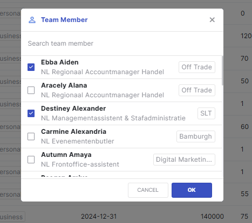
- Or by using the Lock State filter, if you need to unlock all objectives.

- Once you have chosen your filter, you can select all the items.
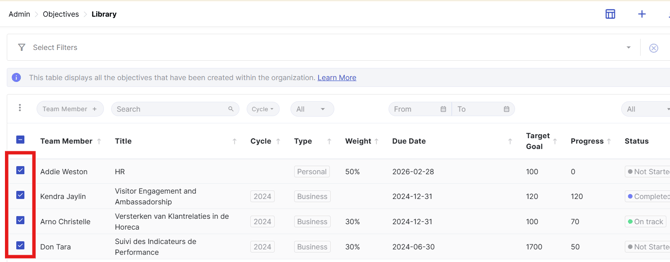
- Then, click the three-dot menu on top of the checkbox
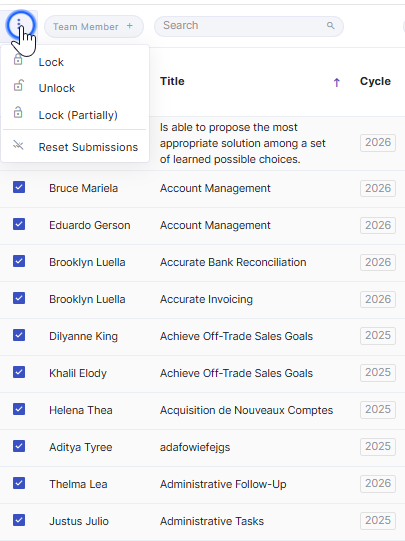
- Select the action you want to perform and then confirm when the pop-up window asks for your confirmation.
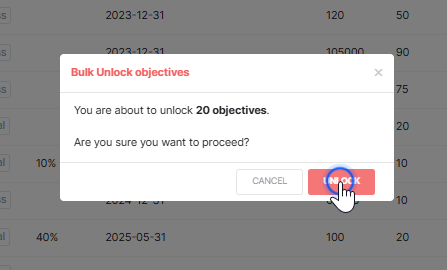
- The selected action will then be applied to all items you have chosen.