![Variation=Brandmark, Color=WhiteVector.svg]](https://support.q7leader.com/hubfs/Variation=Brandmark%2c%20Color=WhiteVector.svg)
Q7 notification and invitation emails may not display correctly in Microsoft Outlook (Classic / “old” Outlook desktop version).
The same emails display correctly in:
-
Outlook on the web (outlook.office.com)
-
Microsoft Outlook (New Outlook desktop app)
-
Other modern email clients (e.g., Gmail, Apple Mail)
The Issue
In Outlook Classic, email formatting may appear:
-
Misaligned
-
Partially broken
-
Visually different from the intended design
The content itself remains present and readable. The issue affects layout and styling only.
Screenshot Comparison
-
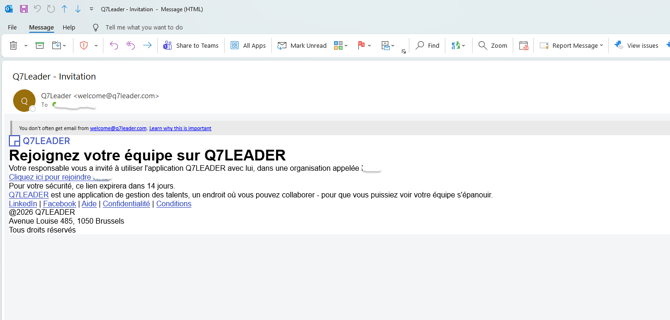
Outlook Classic (“Old” Outlook) – Incorrect Display
In Outlook Classic, the email formatting may appear broken or incorrectly structured.
-
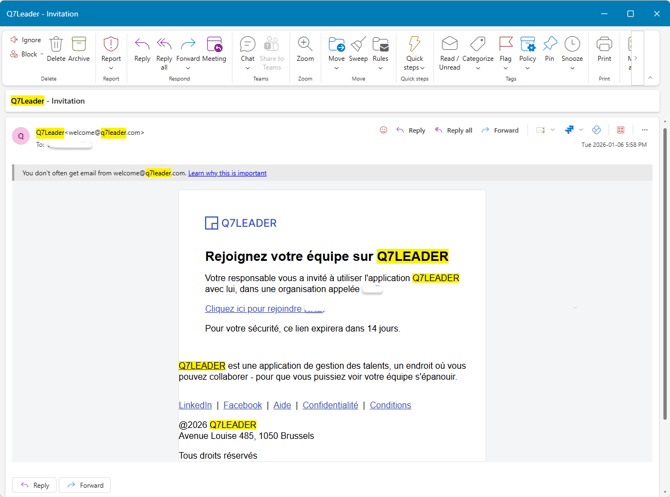
New Outlook – Correct Display
The same email displays correctly in the New Outlook desktop application.
-
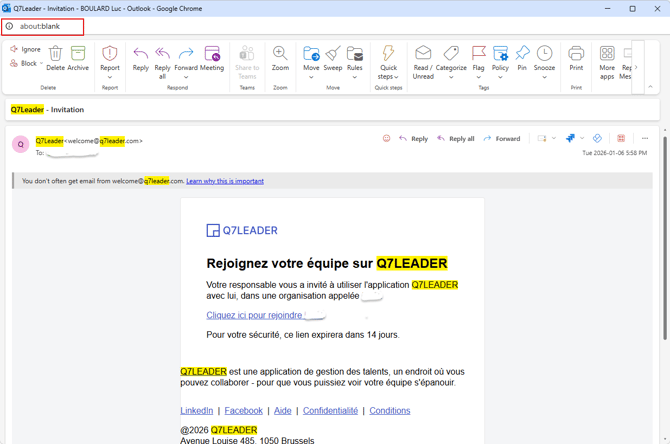
Outlook Web – Correct Display
The same email also displays correctly in Outlook Web (browser version).
Why This Happens
Outlook Classic uses a different rendering engine (based on Microsoft Word) to display emails.
Unlike modern email clients, this engine does not fully support modern HTML and CSS standards. As a result, certain layout components or formatting styles in Q7 emails may not render as intended.
This is a known limitation of Outlook Classic and affects many SaaS platforms — not only Q7.
Our Position
Q7 does not fully support older Outlook clients.
-
All required information is included in the email.
-
The content remains readable and actionable.
-
Only the visual formatting may differ in Outlook Classic.
Recommendations for Users
For the best experience, we recommend:
-
Using Outlook Web (outlook.office.com)
-
Switching to New Outlook if available in your organization
-
If Outlook Classic must be used, note that the email remains fully functional despite formatting differences
Guidance for Administrators
If your organization primarily uses Outlook Classic and users report confusion:
-
Include a note in your Q7 rollout communications explaining potential display differences in Outlook Classic
-
Encourage users to open Q7 emails in Outlook Web if formatting appears incorrect