![Variation=Brandmark, Color=WhiteVector.svg]](https://support.q7leader.com/hubfs/Variation=Brandmark%2c%20Color=WhiteVector.svg)
In this guide, you will learn:
-
How to access and navigate the Insights feature in TeamScan
-
How to use Smart Questions, Distribution Charts, and Quick Insights for actionable analysis
-
How to leverage the Talent 9-Box Grid to assess performance and potential
-
Best practices for applying insights to support HR and managerial decisions
Accessing Insights
To access TeamScan, the required permission must first be enabled for your user role.

Navigate to the Insights feature through the TeamScan module by selecting TeamScan → Insights:

Please note that all insights are based on the most recent TeamScan completed for each individual.
The Insights feature is organized into five main categories:
-
Smart Questions – Interactive prompts that help identify trends and key focus areas for each dimension of the TeamScan.
-
General Charts – Visual overviews of team data, providing high-level insights.
-
Distribution Charts – Breakdown of dimensions across departments or other grouping methods.
-
Quick Insights – Focus on benchmarks, key highlights, and summaries of keys findings.
-
Talent (9-Box Grid) – A visual tool to assess talent and potential across team members.
How to create a Filter:
In all categories except Smart Questions, you can apply filters based on various criteria to focus on specific data. You also have the option to save your filters for later use, which can be especially helpful when preparing presentations or recurring analyses.

For step-by-step instructions on creating filters, please refer to this article.
Smart Questions:
These are interactive prompts designed to help identify trends, patterns, and key focus areas within each dimension of the TeamScan.
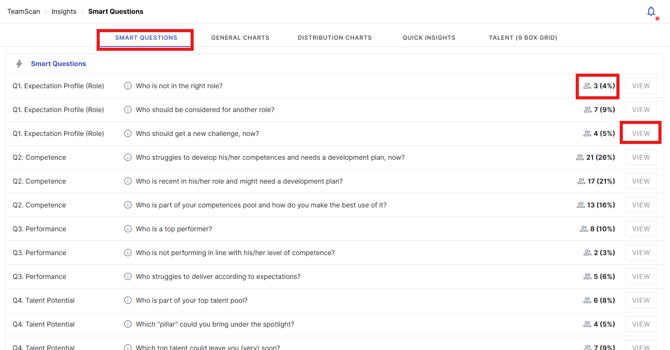
They are a guide to explore relevant data, highlight areas that may require attention, and support informed decision-making. By using Smart Questions, you can quickly uncover insights about team performance, engagement, and development opportunities, making it easier to take targeted actions and plan interventions.
-
On the right side of each question, you will see the number and percentage of team members, organization members, or scope affected.
-
By clicking View, you can directly access the TeamScan profiles of the relevant team members for more detailed information.
General Charts:
These provide visual overviews of team data, allowing HR and managers to quickly understand overall trends and patterns.
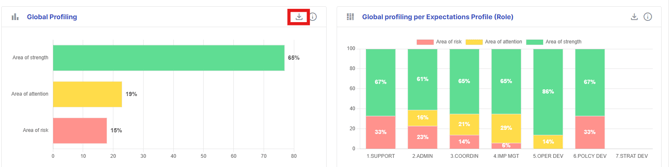
They highlight key metrics such as team performance, engagement, and role distribution, making it easy to identify strengths, areas for improvement, and opportunities for targeted interventions.
General Charts are ideal for high-level analysis and for sharing insights with stakeholders in a clear, visual format.
-
By clicking the download icon, you can export the chart and easily copy it into your presentations.
-
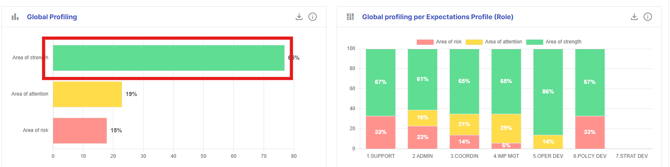
By clicking on the chart, you can view the team members associated with the data.
Distribution Charts:
These charts provide a detailed breakdown of metrics across different roles, teams, or performance levels. They allow to compare groups, identify patterns, and spot areas of strength or concern within the organization.
They are particularly useful for analyzing performance spread, engagement differences, or skill distribution, helping to make data-driven decisions for talent management, team development, and targeted interventions.
-
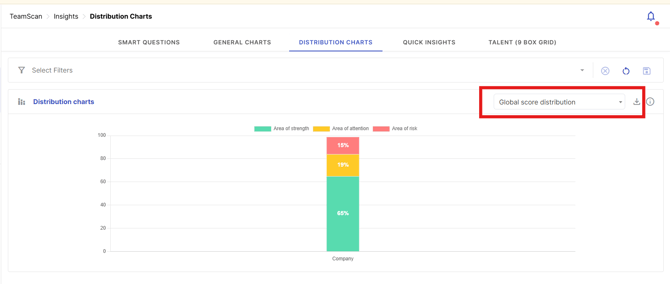
Use the drop-down menu to select the data you want to viewbreakdown dimension:
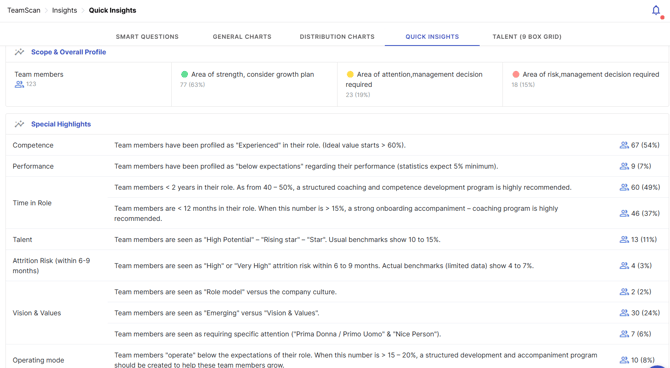
Quick Insights:
This feature provides highlights and summaries of the most important findings from your TeamScan data.
It allows to quickly identify trends, patterns, and potential areas of concern without having to analyze every chart in detail.
Quick Insights are designed to support fast, informed decision-making, enabling you to focus on the actions that matter most for team performance, engagement, and development.
Talent (9 Box Grid):
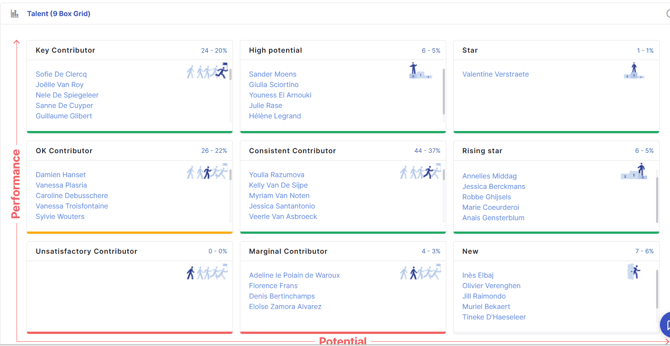
This is a visual tool that helps HR and managers assess team members’ talent and potential.
It organizes employees into a 3x3 matrix, allowing you to quickly identify key contributors, high potentials, and areas needing development.
The 9-Box Grid supports succession planning, targeted coaching, and talent development, making it easier to make informed decisions about promotions, training, and resource allocation.
-
In each box, you can see the team members, the total number, and the percentage they represent. By clicking on a team member’s name, you can directly access their TeamScan individual page.
If you are interested in a deeper dive into your data and in building an HR roadmap with actionable insights, you can contact your CSM.
We can also support you in creating a presentation for your executive team.