![Variation=Brandmark, Color=WhiteVector.svg]](https://support.q7leader.com/hubfs/Variation=Brandmark%2c%20Color=WhiteVector.svg)
The DOT workshop milestone is about managers discussing their teams, calibrating the data and laying the foundations of a solid development plan. Refresher video here.
In this article, you will learn how to:
- Export and prepare your team members file
- Generate a schedule using AI
- Prepare for the DOT workshop and execute the DOT meetings
Step 1: Prepare Your Team Members
Export your team members list from myQ7Leader.
-
Go to the Organization section and select Team Members.
-
Click the three dots in the top-right corner.
-
Select “Export Team Members to CSV” to download your list.

Convert a CSV File to an Excel File
-
In Excel, go to the Data tab.
-
Click Get Data → From File → From CSV.
-
Select your CSV file and click Import.
-
Choose Comma as the delimiter.
-
Transform your data as needed.
-
Save the file as an Excel workbook (.xlsx).
For more detailed instructions, please refer to this article.
- Select the specific team members you want to include in the DOT meetings.
Step 2: Scheduling the DOT workshop
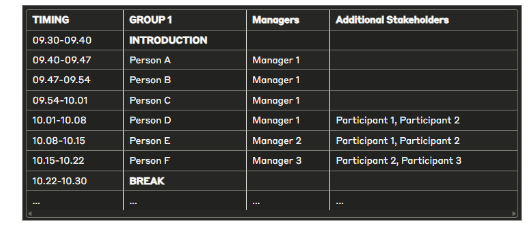
Ask your preferred AI tool to create a 7-minute schedule per team member, including 10-minute breaks between each hour.
Make sure the schedule accounts for all participants and is balanced to avoid overloading any stakeholder.
To prepare for the DOT workshop, you are requested to schedule the sessions. Each session covers up to 25 team member profiles.
Key Guidelines:
-
Invite 3–4 managers per session (up to 5 if their teams are small).
-
Discussions last approximately 7 minutes per profile.
-
Sessions are ideally scheduled for 2.5–3 hours.
Manager Composition:
-
Include managers who are familiar with each other’s direct reports or have collaborated with them.
-
Including the manager of managers can be beneficial for a well-informed validation of the ProfileScan and productive discussions about the team members’ next steps, but it is not required.
You can find inspiration for the invite here.
Step 3: Preparing the DOT workshop
-
Pre-set filters: Prepare and save filters in the platform before the session to ensure that only the team members being discussed appear in the TeamScan module.
-
Privacy rules: Participants should never see their own ProfileScan or that of their manager(s). For detailed instructions, watch HR’s guide to filters or consult this article for this specific purpose.
-
Platform familiarity: Make sure you are comfortable navigating the platform, accessing and editing notes, editing ProfileScans, and handling the TeamScan section.
Step 4: Execute the DOT Meetings
Guidelines for a Successful DOT Workshop
-
Follow the AI-generated schedule precisely to maintain time discipline.
-
Planned breaks help participants stay focused and alert.
-
Shared expectations about momentum ensure productive discussions without drifting into informal “lean-back” coffee chats.
Key Roles:
-
Facilitator: Q7 or HR team
-
Note-taker: HR team or volunteer
-
Platform navigator: HR team or volunteer
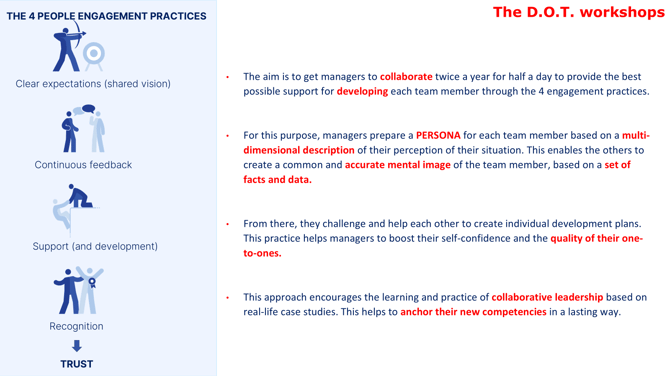
Remember the spirit of the DOT workshop outlined below.
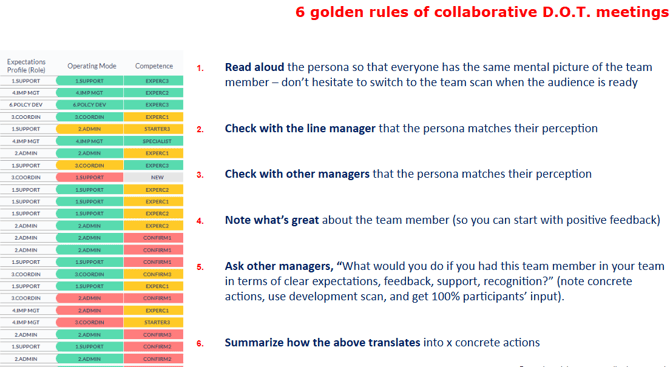
As well as the structured format that we cover per profile in 7 minutes:
Benefits and Handling Exceptions
This approach provides clear time tracking, effortless planning with AI, focused short sessions, and strategic insights for senior leaders and HR. If a Teamscan calibration discussion takes too long, tag the item in the schedule sheet for offline follow-up. For unclear actions regarding a talent, assign next steps for the manager to gather additional information before the next discussion.
What if someone deviates from the schedule?
This rarely happens because the schedule is short, balanced, and strictly timed (no session exceeds 10 minutes).