![Variation=Brandmark, Color=WhiteVector.svg]](https://support.q7leader.com/hubfs/Variation=Brandmark%2c%20Color=WhiteVector.svg)
The GEP and Time-in-Role management feature in TeamScan allows managers to modify the GEP for a role within the ProfileScan of team members.
Unless there is a specific need for managers to edit HR data, it is recommended to keep this setting turned off.
Indeed, as the GEP is defined by the organization for each role and is the core of the methodology.
All team members in the same role share the same GEP, and managers do not set the role’s expectations.
Managers’ responsibility is to assess the operating mode of team members against these expectations, which they can always provide feedback on in the Teamscan.
What does this mean in practice?
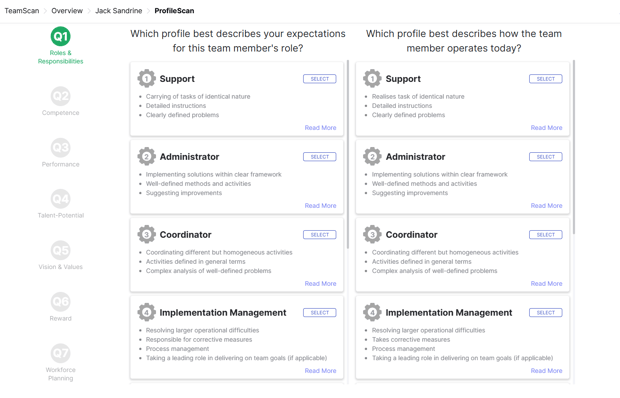
When a manager begins profiling a team member, the first question under Roles and Responsibilities becomes editable.
The manager can then select the “Expectations” instead of just choosing the “Operating Mode”.