![Variation=Brandmark, Color=WhiteVector.svg]](https://support.q7leader.com/hubfs/Variation=Brandmark%2c%20Color=WhiteVector.svg)
Notifications are directly linked to the submission flow. Any action such as saving, submitting, editing, or resetting a submission can trigger (or not trigger) a notification.
This same logic applies to:
-
Objectives
-
Conversations
-
Objectives inside conversation templates
Quick Summary
- Notifications depend on:
- the current state of the item
- who performs the action
- whether someone has already submitted
- Submitting an item notifies the other participant.
- Editing an item after it has been submitted by one participant resets the submission and requires re-submission.
- Once both parties have submitted, the item is Signed Off and locked.
- Admins can reset submissions at any time, which will trigger notifications.
Notifications Overview
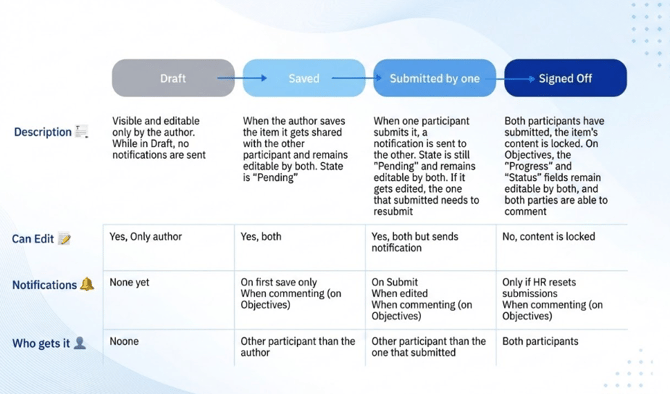
Technical overview of notification behavior by status
When the State is: New and Draft
The item (objective or conversation) has been created but has not yet been shared between the Manager and the Team Member.
|
Action |
Author | Who gets notified |
| Save Draft | All | / |
| Save or Submit | Team Member | Manager |
| Save or Submit | Manager | Team Member |
| Save or Submit | Other | Manager & Team Member |
When the State is Pending and Neither participant has submitted
The item is saved and shared, but no one has submitted it yet.
| Action | Author | Who gets notified |
| Save or Edit + Save | All | / |
| Submit or Edit + Submit | Team Member | Manager |
| Submit or Edit + Submit | Manager | Team Member |
| Submissions Reset | Admin | / |
When the State is Pending and only One participant has submitted
One participant (the Team Member or the Manager) has submitted the item. The other participant still needs to submit.
Editing after a submission resets the previous submission and requires re-submission.
| Action | Author | Who gets notified |
| Save | All | / |
| Edit + Save or Submit | Manager | Team Member (+ has to submit again) |
| Edit + Save or Submit | Team Member | Manager (+ has to submit again) |
| Submit (without editing) | Team Member | Manager |
| Submit (without editing) | Manager | Team Member |
| Submissions Reset | Admin | The one who has not submitted gets notified |
When the State is Signed Off and Both parties have submitted
Submitted by both parties. The item is now locked.
| Action | Author | Who gets notified |
| Submissions Reset | Admin | Team Member & Manager |
Anytime (Objectives Only)
At any time, the progress of objectives can be tracked and commented on by the Team Member or the Manager.
| Action | Author | Who gets notified |
| Comment | Team Member | Manager |
| Comment | Manager | Team Member |
| Comment | Other | Team Member & Manager |
Important limitations & edge cases
This submission and notification workflow works best when both the Team Member and the Manager have user accounts and are assigned.
-
Both have user accounts → Submission works normally (double submission possible).
-
Only one has a user account → That user can submit, but double submission is not possible.
-
Neither has a user account → Digital submission does not work.
-
Team Member without a Manager → The Team Member can submit, but double submission is not possible.
Conversations require both a Team Member and a Manager to be assigned and always involve exactly two participants. The two people already participating to a conversation cannot be changed (for example if the manager changes after a conversation is started between the previous manager and team member).
Objectives can be created without both users assigned. However, without a Manager, double submission is not possible.
If a Manager submits an objective, they will continue to receive notifications even if the Manager assignment later changes.
To redirect notifications to a new Manager, an Admin must reset the submission so the Team Member and the new Manager can submit again.