![Variation=Brandmark, Color=WhiteVector.svg]](https://support.q7leader.com/hubfs/Variation=Brandmark%2c%20Color=WhiteVector.svg)
The Big Idea: From One Big Campaign to a Process of Campaigns
Today, a single Campaign tries to do everything at once: it can hold a TeamScan, a SelfScan, and a Conversation, all sharing the same dates and the same list of people.
That's rigid: no reminders, no late submissions, and no way to react if someone's manager changes.
Processes breaks that single package into smaller, purpose-built pieces:
- A Process is the overall initiative: for example “Q3 Performance Review 2026”.
- Inside it, you add one or more Campaigns. Each one a single activity: a TeamScan, a SelfScan, or a Conversation.
- Each Campaign has its own participant list, its own dates, and its own reminders.
The result: far more flexibility, with each piece of the process able to run on its own schedule and react independently to changes.
Living Alongside the Old System
Processes doesn't replace the current system overnight.
The two run in parallel for 90 days.
You'll see a Legacy tab inside the Processes Module for as long as old campaigns still exist; new campaigns can only be created in the new module.
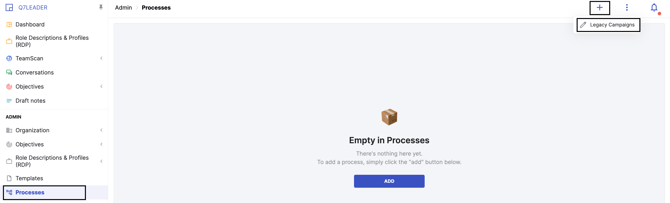
Any legacy campaign still open after 90 days is automatically closed as a safety net.
Feature Highlights:
- Independent Campaigns Inside a Process
- Reminders: Up to Six per Campaign
- Late Submissions Are Now Accepted
- People Can Be Added or Removed Mid-Campaign
- Manager Changes Flow Through Automatically
- Saveable Participant Filters
- Richer Reporting
- Smarter Behavior Across Other Modules
To create a new process or campaign, please refer to this article.
To learn how to manage your active processes and campaigns, please consult this guide.
Independent Campaigns Inside a Process
A Process can hold any mix of Campaigns you like: one TeamScan, one SelfScan, one Conversation, or even two TeamScans.
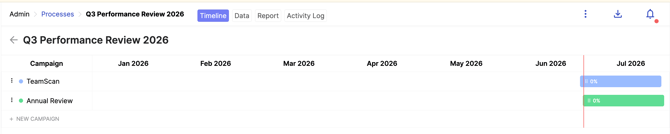
Each Campaign keeps its own participant list, so adding someone to one Campaign never affects the others.
Reminders: Up to Six per Campaign
Reminders are entirely new. You can schedule up to two reminders in each of three phases:
- Pre-start: sent to everyone before the Campaign opens, as a heads-up.
- Pre-end: sent only to people who haven't finished yet, before the deadline.
- Post-end: sent only to people who still haven't finished, after the deadline.
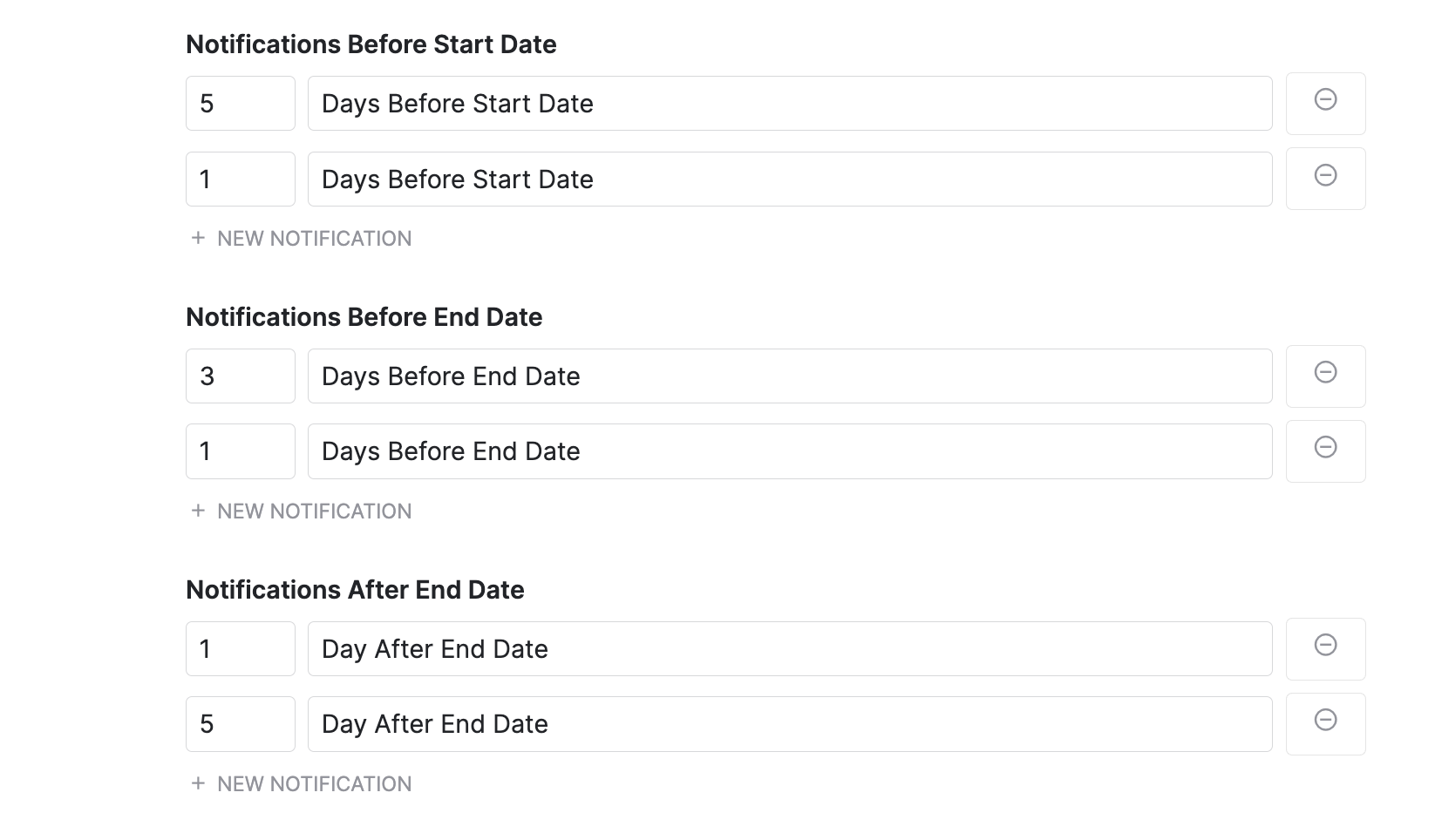
The system also validates dates for you: a pre-start reminder can't be scheduled after the Start Date, and so on.
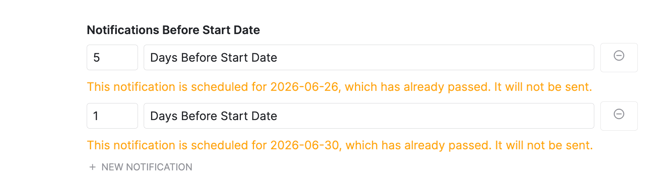
If you do set a reminder in the past, you'll get a clear warning that it won't fire.
Late Submissions Are Now Accepted
The End Date is now a soft deadline. When creating a new campaign, you can enable the Accept Late Submissions option to allow participants to submit their responses after the campaign end date.

Late submissions are clearly marked as Late in reports and remain accepted until a campaign administrator locks the campaign.
Tasks also remain visible on participants' dashboards after the end date, where they are labeled Overdue instead of disappearing.
If Accept Late Submissions is not enabled, participants cannot submit after the end date, and the task is removed from their dashboard once the deadline has passed.
People Can Be Added or Removed Mid-Campaign
You're no longer locked into the original participant list.
-
Add someone after the Campaign has started and they immediately receive the Activity Request.
-
Remove someone and a confirmation modal tells you exactly what will happen: whether their data is simply discarded (if they hadn't started) or archived for audit (if they had).
Manager Changes Flow Through Automatically
This is one of the most requested fixes.
If an employee's manager changes mid-Campaign, through an edit, a reassignment on deactivation, or a bulk import, the system reacts on its own:
- The old manager hadn't submitted: it quietly moves to the new manager.
- The old manager had already submitted it: nothing changes their submission is kept for audit.
- For a TeamScan in progress, the new manager starts fresh rather than inheriting a half-written assessment.
- For a Conversation in progress, the member's contribution is preserved while a fresh approval is requested from the new manager.
Saveable Participant Filters
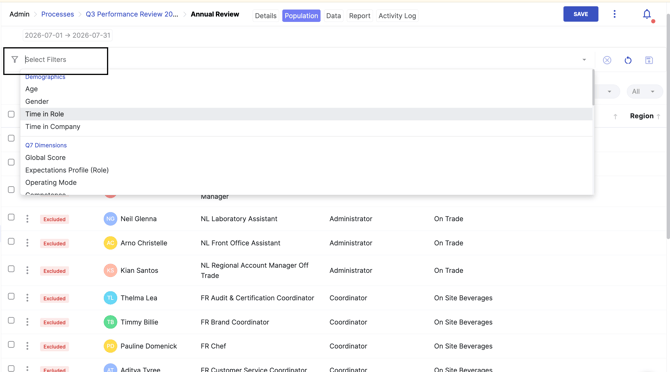
Building the same participant list for multiple Campaigns used to mean repeating the same filtering work.
Now you can save a filter (for example “Sales Team - Full-time”) once and load it again in any other Campaign in the Process.
Richer Reporting
Reporting now happens at two levels:
- Per-Campaign reports show participant status, on-time/late tags, and scores or conversation answers.
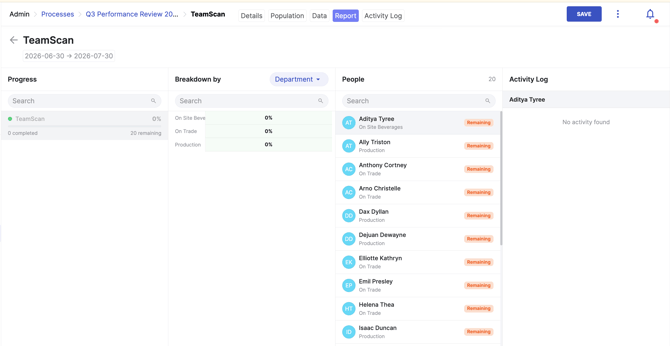
- A Process-level report gives a bird's-eye view across every Campaign in the Process, including side-by-side metrics and a combined CSV export.
Removed participants are excluded from reports but kept in the audit trail, and you can explicitly choose which Campaigns to compare across different Processes.
Smarter Behavior Across Other Modules
The improvements ripple out beyond the Campaigns area itself:
- Dashboard Agenda: tasks now show Process name › Campaign name, stay visible after the deadline, and no longer appear twice for Conversations.
- TeamScan, SelfScan and Conversations: activities are now created “lazily,” only the moment someone actually clicks the task, so no orphan records pile up if nobody ever opens them.
- Conversations: the form template used is locked in at Campaign creation, so editing the template later doesn't change anything for that Campaign.
Together, these changes turn Campaigns from a single rigid package into a flexible toolkit:
-
Independent timing per activity
-
Automatic reminders
-
Resilience to organizational changes
-
Reporting that actually reflects what happened.
All while giving you a full 90-day transition window to move over at your own pace.