![Variation=Brandmark, Color=WhiteVector.svg]](https://support.q7leader.com/hubfs/Variation=Brandmark%2c%20Color=WhiteVector.svg)
Validation rules move from the conversation template to the cycle, so they apply to every objective, all year long, and not only during a campaign.
Accessing Cycles
You need Admin access to the Objectives module.
The Manage: Objectives permission must be enabled for your role.

In this guide, you’ll find more information about:
- What’s changing in Cycle configuration
- What you’ll find inside a Cycle
- Why the new approach is flexible
- How Cycles work in the platform
Why this change
Until now, validation rules were set on the conversation template. They only applied during a campaign, and only to people who went through the conversation.
Objectives created directly in the Objectives module weren't checked at all.
Rules now live on the cycle. Every objective belongs to a cycle, so the rules apply all year, inside or outside a campaign.
Objectives themselves stay the same; only the frame around them changes.
|
|
Before |
Now |
|
Where rules live |
On the conversation template |
On the cycle |
|
When rules apply |
Only during a running campaign |
All year long |
|
Who rules apply to |
Only people going through the conversation |
Every member in the cycle’s population |
|
Different rules for different groups |
Not possible |
Possible, with one cycle per population |
|
How members see objectives |
A flat list of objectives |
Objectives grouped by cycle, with a live status |
|
Notifications on submission |
One per objective |
One per cycle |
What's in a cycle
A cycle used to be just a name, a description and two dates. It now also defines who it applies to and how it runs through the year.
Population
-
Each cycle applies to a group of members. By default that's everyone, and new joiners are added automatically.
-
You can also target a specific group, such as a department or a country.
-
That way different teams can follow different rules, each in their own cycle. Members only see the cycles they belong to.
Phases
A cycle goes through five phases over the year:
| Phase | What happens |
|---|---|
| Draft | Admins prepare the cycle. Members can't see it yet. |
| Setting (optional) | Members create and agree on their objectives. |
| In-progress | Members update progress and can add objectives. |
| Review (optional) | Each objective gets its final status and progress. |
| Closed | Everything is locked and read-only. |
-
Each phase decides what members can do and which rules apply.
-
Admins move the cycle from one phase to the next themselves.
-
If you don't need separate steps, you can skip Setting and Review and stay in In-progress until you close the cycle.
Validation rules
Setting, In-progress and Review can each have their own rules. The rules can set:
- How many objectives a Team Member should have (minimum and maximum)
- The total weight of their objectives
- Which objective types Team Members can create
- Which statuses are accepted
- Which metrics are allowed
Some rules can apply to all objectives and others to specific types only.
For example, business objectives must be in percentage and carry all the weight, while personal objectives are Yes/No with no weight.
Progress options
-
For objectives measured in percentage, you can set a fixed scale (for example 0, 25, 50, 75, 100).
-
This keeps progress consistent across the organisation. It doesn't affect whether a member is green or red.
Green or Red status
-
Each member gets a status per cycle.
-
It's green when their objectives follow all the rules of the current phase, and red when they don't.
-
On the Objective Set page, each rule shows a tick or a cross, so members can see exactly what to fix.
Flexible during the year, checked at submission
The rules guide members, but they don't block them.
- During the year: members can save unfinished objectives, add new ones or leave their set incomplete. Their status simply shows where they stand. (Red or Green)
- At submission: a cycle, or a Conversations & Objectives activity in a campaign, can only be submitted when the status is green. HR always receives a complete set that follows the rules.
Good to know: green only means the objectives follow the rules. It doesn't mean they've been submitted.
You can also choose not to count objectives marked Cancelled or Replaced. That way members can change their objectives during the year and stay green.
How cycles work with the rest of the platform
Campaigns
The Conversation activity is now called Conversations & Objectives.
You no longer set objective rules in the conversation template. You just link the campaign to one or more cycles.
- One page: members and managers see the conversation and the cycles side by side.
- Only relevant cycles: each participant only sees the cycles they belong to.
- Saved as submitted: when a member submits, their objectives and the rules that applied are saved as they are. Later changes don't affect them.
- Flexible setup: you can run Setting and Review in the same campaign or in separate ones. You can also run an objectives-only campaign by using a conversation with just an information box.
Objectives module and dashboards
-
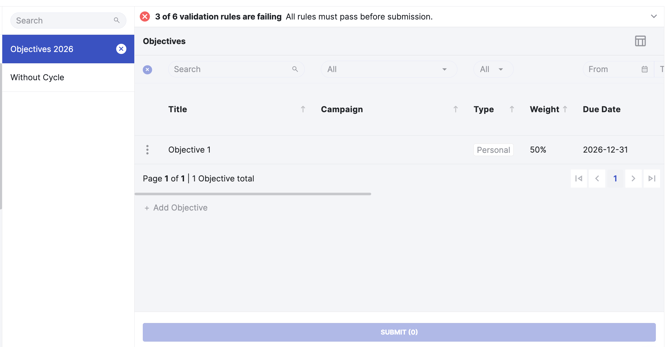
Objectives are now grouped by cycle instead of shown in one list.
-
Active cycles come first, then objectives without a cycle, then closed cycles.
-
Dashboards and profile views follow the same layout.
Objectives without a cycle
-
Members can still create an objective outside a cycle, but it has to be a deliberate choice. These objectives aren't covered by any rules and can't be submitted in a campaign.
-
When a member creates an objective from a cycle's page, it's added to that cycle automatically.
Notifications
-
Notifications are now sent per cycle, not per objective.
-
A submission with six objectives sends one notification instead of six.
-
Changing a cycle's phase doesn't send any notification.
|
Role |
What they need to do |
|
Admins |
Define the framework once per cycle (population, phases, rules), keep control of the calendar by moving phases manually, and receive complete, valid sets at submission. |
|
Managers |
See their team’s objectives grouped by cycle with a clear status, fewer notifications, and one submission per cycle to review. |
|
Members |
See only the cycles that concern them, know at any moment whether their objectives meet expectations, and keep full freedom to work on them during the year. |